Elasticsearch 인덱스 최적화
기존 authors 필드는 text 타입으로 작성했었는데, 이를 nested 타입으로 변경하면 더 정교한 검색을 할 수 있다.
우선, 간단하게 text 타입과 nested 타입의 차이를 알아보자.
- text 타입
문서 내 텍스트를 저장하고 검색하는 일반적인 방식
텍스트 분석기를 사용해 토큰화 및 역색인을 생성한다.
다중 값 (배열) 필드 내의 개별 요소를 개별적으로 매칭하는 것이 어렵다는 단점이 있다.
text 타입을 사용한 예제 데이터로 확인해보자.
{
  "title": "Understanding Deep Learning",
  "authors": ["Alice Smith", "Bob Johnson"]
}
검색 예제는 다음과 같다고 가정해보자.
{
  "query": {
    "match": {
      "authors": "Alice"
    }
  }
}
검색 결과는 Alics Smith가 포함된 문서를 찾게 된다.
그러나, Alice Smith와 Bob Johnson을 같은 필드에서 다루기 때문에, Alice Johnson을 검색해도 문서가 매칭되는 문제가 발생할 수 있다.
- nested 타입
객체 배열을 별도의 독립적인 문서처럼 저장하는 방식이다.
정확한 일치 검색이 가능하며, 각 객체를 개별적으로 검색할 수 있다.
단점으로는, 쿼리 시 성능 저하가 발생할 수 있다.
nested 타입을 사용한 예제 데이터로 확인해보자.
{
  "title": "Understanding Deep Learning",
  "authors": [
    {"name": "Alice Smith", "institution": "MIT"},
    {"name": "Bob Johnson", "institution": "Stanford"}
  ]
}
검색 예제는 다음과 같다고 가정해보자.
{
  "query": {
    "nested": {
      "path": "authors",
      "query": {
        "bool": {
          "must": [
            { "match": { "authors.name": "Alice" } },
            { "match": { "authors.institution": "MIT" } }
          ]
        }
      }
    }
  }
}
검색 결과, Alice Smith가 MIT에 소속된 문서만 반환되어 정확한 매칭이 가능하다.
- text vs. nested
| 비교 항목 | text (일반 필드) | nested (중첩 필드) |
| 구조 | 단일 필드 내에 여러 값 저장 가능 | 개별 객체가 독립적인 서브 문서로 저장 |
| 검색 방식 | 단어 단위로 분석해 검색 | 객체 단위로 검색 |
| 정확도 | Alice Smith와 Bob Johnson이 같은 필드에 있으면 Alice Johnson 검색 시 잘못된 매칭 가능 | Alice Smith가 MIT 소속인 경우만 정확하게 검색 가능 |
| 성능 | 빠름 | 상대적으로 느림 |
| 활용 예시 | 간단한 텍스트 검색 (제목, 본문 등) | 저자, 소속 기관 등의 관계형 데이터 |
그럼 이제 기존의 코드를 수정해보자!
"authors": { "type": "nested", "properties": {
    "name": { "type": "text" },
    "institution": { "type": "text" }
}},
"authors": {
"type": "nested",
"properties": {
  "name": { "type": "text" },
  "institution": { "type": "text" }
}},
최종 paper_etl.py
from airflow import DAG
from airflow.operators.python import PythonOperator
from datetime import datetime, timedelta
from elasticsearch import Elasticsearch
import requests

# Elasticsearch 연결하기
es = Elasticsearch("http://elasticsearch:9200")


def create_index_if_not_exists():
    """Elasticsearch 인덱스가 없으면 생성"""
    index_name = "research_papers"
    if not es.indices.exists(index=index_name):
        es.indices.create(index=index_name, body={
            "settings": {
                "number_of_shards": 1,
                "number_of_replicas": 1
            },
            "mappings": {
                "properties": {
                    "title": { "type": "text" },
                    "abstract": { "type": "text" },
                    "authors": {
                        "type": "nested",
                        "properties": {
                        "name": { "type": "text" },
                        "institution": { "type": "text" }
                        }
                    },
                    "publication_date": { "type": "date" },
                    "doi": { "type": "keyword" },
                    "category": { "type": "text" },
                    "source": { "type": "keyword" },
                    "url": { "type": "keyword" }
                }
            }
        })
        print(f"Index '{index_name}' has been created.")


def fetch_papers(**kwargs):
    """API를 이용해 논문 데이터 가져오기"""
    url = "https://api.biorxiv.org/covid19/0"
    response = requests.get(url)

    # API 응답 상태 확인
    if response.status_code != 200:
        print(f"API 요청 실패: {response.status_code}")
        return []

    papers = response.json().get("collection", [])

    # XCom (Cross-Commuinication)을 이용해 데이터 저장하기
    kwargs['ti'].xcom_push(key="papers", value=papers)
    print(f"가져온 논문 데이터 수: {len(papers)}")


def index_papers(**kwargs):
    """Elasticsearch에 논문 색인하기"""
    ti = kwargs['ti']
    papers = ti.xcom_pull(task_ids="fetch_papers", key="papers")

    if not papers:
        print(f"색인할 논문 데이터가 존재하지 않습니다.")
        return

    for paper in papers:
        authors_list = [{
            "name": author.get("author_name", "Unknown"),
            "institution": author.get("author_inst", "Unknown")
        } for author in paper.get("rel_authors", [])]

        doc = {
            "title": paper.get("rel_title", "No Title"),
            "abstract": paper.get("rel_abs", "No Abstract"),
            "authors": authors_list,
            "publication_date": paper.get("rel_date", "1970-01-01"),
            "doi": paper.get("rel_doi", ""),
            "category": paper.get("category", "Unknown"),
            "source": paper.get("rel_site", "Unknown"),
            "url": paper.get("rel_link", "")
        }

        # 논문 DOI를 Elasticsearch의 _id로 설정해 중복 저장을 방지
        doc_id = paper.get("rel_doi", paper.get("rel_title", "no_id"))

        try:
            es.index(index="research_papers", id=doc_id, body=doc)
            print(f"논문 색인 완료: {doc['title']}")
        except Exception as e:
            print(f"논문 색인 실패 ({doc['title']}): {e}")

# DAG 설정
default_args = {
    "owner": "airflow",
    "start_date": datetime(2025, 2, 4),
    "retries": 1,
    "retry_delay": timedelta(minutes=5),
}

dag = DAG(
    "paper_etl",
    default_args=default_args,
    schedule_interval="0 6 * * *", # 매일 오전 6시에 실행하도록 설정
    catchup=False
)

init_index_task = PythonOperator(
    task_id="init_es_index",
    python_callable=create_index_if_not_exists,
    dag=dag,
)

fetch_task = PythonOperator(
    task_id="fetch_papers",
    python_callable=fetch_papers,
    provide_context=True,
    dag=dag,
)

index_task = PythonOperator(
    task_id="index_papers",
    python_callable=index_papers,
    provide_context=True,
    dag=dag,
)

init_index_task >> fetch_task >> index_task
dag 파일을 수정한 후 컨테이너를 다시 띄운 뒤 DAG를 실행해준다.
데이터가 잘 저장되었는지 확인해보자!
- curl 명령어로 확인하기
curl -X GET "http://localhost:9200/research_papers/_search?size=5&pretty=true"

Kibana에서 논문 데이터 조회하기
http://localhost:5601에 접속하면 Kibana 대시보드를 확인할 수 있다.
(관련 설정은 이전 포스팅의 docker-compose.yml 파일을 참고)
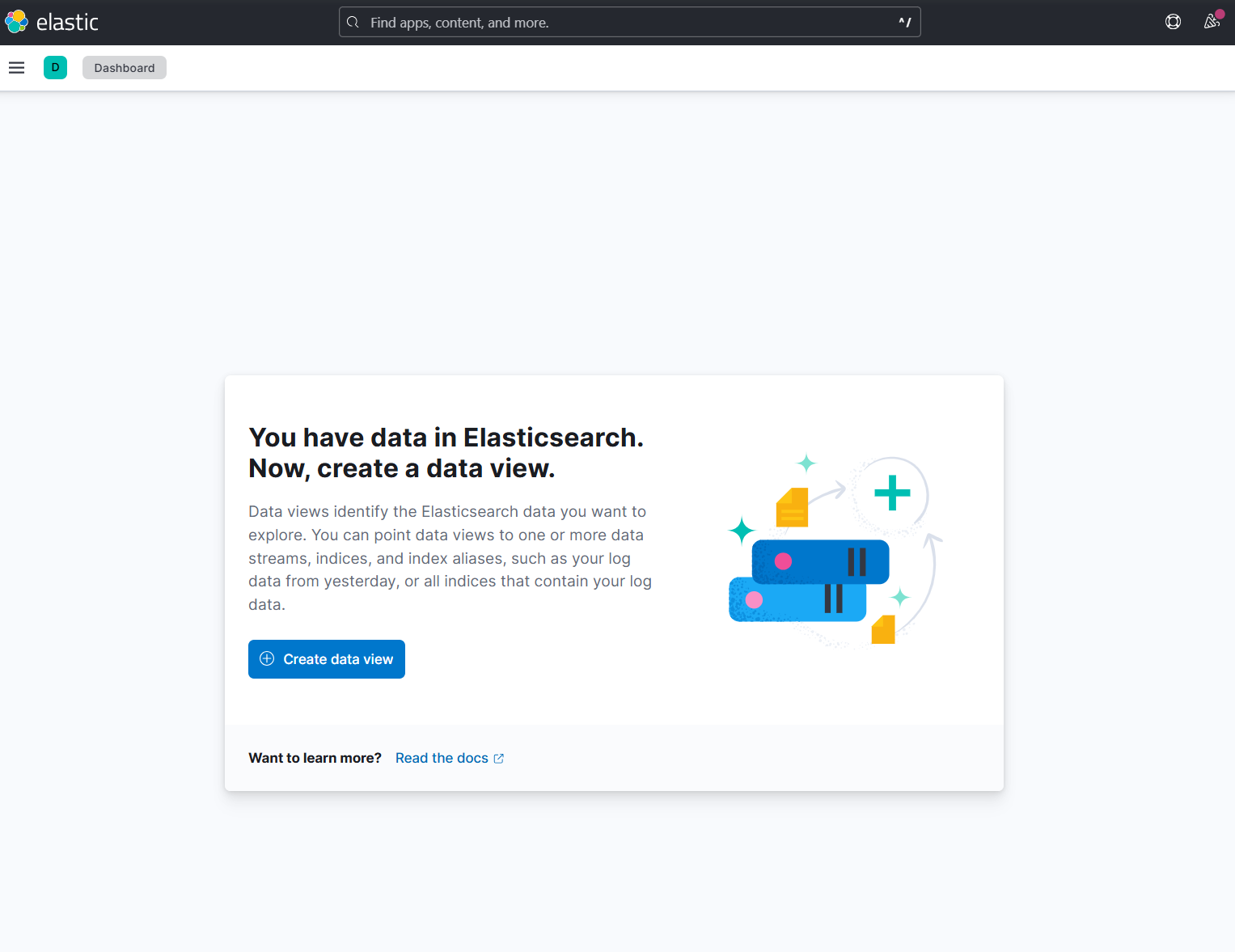
해당 메시지는 현재 Elasticsearch에 데이터가 존재하지만, Kibana에서 이를 조회하기 위해 데이터 뷰를 설정해야한다는 것을 의미한다.
- Kibana에서 Data View 생성하기
1. [Create data view] 클릭
2. Index pattern 입력 -> Elasticsearch의 인덱스 이름과 동일해야 한다. 내 경우에는 research_papers 입력
3. Time field 설정 -> publication_date 선택 (논문 데이터의 날짜 필드)
4. [Create data view] 클릭


저장된 논문 데이터를 Discover에서 확인할 수 있다!
검색 기능 테스트, 필드 분석, 시각화, 대시보드 만들기 등의 작업을 하며 학습할 수 있을 것 같다.
심도 있는 활용은 프로젝트 완성 후 개별적으로 진행해 볼 예정이다.
논문 검색 기능 개선하기
FastAPI를 활용해 Elasticsearch와 연동하는 검색 API를 개발하는 과정인데, 이전에 설정했던 기능보다 좀 더 강화할 필요가 있다고 본다.
(이전 포스팅 참고)
Airflow DAG 파일에서 author 필드를 nested 타입으로 변경했기 때문에, nested query를 추가하고 검색 정렬 기준도 추가할 것이다.
기존 코드
from fastapi import FastAPI
from elasticsearch import Elasticsearch

app = FastAPI()
es = Elasticsearch("http://elasticsearch:9200")

@app.get("/search")
async def search_papers(query: str):
    """Elasticsearch에서 논문 검색 수행"""
    body = {
        "query": {
            "multi_match": {
                "query": query,
                "fields": ["title", "abstract", "author"]
            }
        }
    }
    response = es.search(index="research_papers", body=body)
    return {"results": response["hits"]["hits"]}

@app.get("/")
def read_root():
    return {"message": "Hello, FastAPI!"}
수정 후 코드
from fastapi import FastAPI, Query
from elasticsearch import Elasticsearch

app = FastAPI()
es = Elasticsearch("http://elasticsearch:9200")

@app.get("/search")
async def search_papers(
    query: str,
    author: str = Query(None, description="Search by author's name"),
    sort_by: str = Query("publication_date", description="Sort field"),
    order: str = Query("desc", description="Sort order ('asc' or 'desc')")
):
    """Elasticsearch에서 논문 검색 수행"""

    # 기본 검색 쿼리
    query_body = {
        "query": {
            "bool": {
                "should": [
                    {"multi_match": {
                        "query": query,
                        "fields": ["title", "abstract", "category"]
                    }}
                ],
                "minimum_should_match": 1
            }
        },
        "sort": [
            {sort_by: {"order": order}}
        ]
    }

    # 저자 검색이 포함된 경우, nested query를 추가
    if author:
        query_body["query"]["bool"]["must"] = [
            {
                "nested": {
                    "path": "authors",
                    "query": {
                        "match": {
                            "authors.name": author
                        }
                    }
                }
            }
        ]

    response = es.search(index="research_papers", body=query_body)

    return {"results": response["hits"]["hits"]}


@app.get("/")
def read_root():
    return {"message": "Hello, FastAPI!"}
코드를 수정했다면 컨테이너를 종료하고 다시 띄워준다.
fastapi 컨테이너가 잘 띄워졌다면 검색 요청을 해보자.
- 기본 검색 (키워드 검색)
요청 메시지
curl -X GET "http://localhost:8000/search?query=COVID"
응답 메시지
{
  "results": [
    {
      "_index": "research_papers",
      "_id": "10.1101/2025.02.02.24318641",
      "_source": {
        "title": "Molecular and Immunological Signatures of Long COVID",
        "abstract": "The COVID-19 pandemic, caused by the SARS-CoV-2 virus...",
        "authors": [
          {"name": "Jorine KN Hammink", "institution": "JorClinic BV"},
          {"name": "Tim R van Elst", "institution": "Parasite Clinic"}
        ],
        "publication_date": "2025-02-04",
        "doi": "10.1101/2025.02.02.24318641",
        "category": "infectious diseases",
        "source": "medRxiv",
        "url": "https://medrxiv.org/cgi/content/short/2025.02.02.24318641"
      }
    }
  ]
}
- 저자 (author) 이름으로 검색
요청 메시지
curl -X GET "http://localhost:8000/search?query=COVID&author=Jorine%20KN%20Hammink"
응답 메시지
{
  "results": [
    {
      "_index": "research_papers",
      "_id": "10.1101/2025.02.02.24318641",
      "_source": {
        "title": "Molecular and Immunological Signatures of Long COVID",
        "abstract": "The COVID-19 pandemic, caused by the SARS-CoV-2 virus...",
        "authors": [
          {"name": "Jorine KN Hammink", "institution": "JorClinic BV"},
          {"name": "Tim R van Elst", "institution": "Parasite Clinic"}
        ],
        "publication_date": "2025-02-04",
        "doi": "10.1101/2025.02.02.24318641",
        "category": "infectious diseases",
        "source": "medRxiv",
        "url": "https://medrxiv.org/cgi/content/short/2025.02.02.24318641"
      }
    }
  ]
}
일단 이런 형태로 검색 기능을 개선해보았는데, 정렬 기준을 개선하거나 author 외에도 category, source, institutution 필드도 검색할 수 있도록 확장해서 프로젝트를 개선할 수 있을 것 같다!
'Data Engineering > Elasticsearch' 카테고리의 다른 글
| [Opensearch] Opensearch 개념 정리 (0) | 2025.02.11 |
|---|---|
| [Elasticsearch] 논문 검색 엔진 구현 프로젝트 (Elasticsearch + Airflow + FastAPI) (4) (0) | 2025.02.06 |
| [Elasticsearch] 논문 검색 엔진 구현 프로젝트 (Elasticsearch + Airflow + FastAPI) (3) (0) | 2025.02.05 |
| [Elasticsearch] 논문 검색 엔진 구현 프로젝트 (Elasticsearch + Airflow + FastAPI) (1) (0) | 2025.02.04 |
| [Elasticsearch] Elasticsearch 기본 개념 (0) | 2025.02.04 |